- July 1, 2020
- Posted by: Forex Wiki Team
- Category: Free Forex EA
Hi Forex Wiki Friends,
Fx Dangerous Storm EA Description :
Currency pairs : EURUSD, AUDUSD, GBPUSD
Timeframe : H1
Trading time : 24/5
Description :
Infinity Expert Advisor is a safe and fully automated Expert Advisor that analyzes market trends and price movements and is therefore able to achieve high rates of winning transactions.
Each order has StopLoss (real or virtual), and EA has advanced filtering functions along with protection against spread and slippage.
The EA does NOT use dangerous strategies such as Martingale, Grid or Arbitrage. This advisor is fully user-configurable.
The EA is not limited to a trading pair or timeframe (it is recommended to use EURUSD H1 on the timeframe. The default settings for the Infinite Storm EA are optimized for EURUSD H1.
The EA was tested on both platforms (MT4 and MT5) and successfully passed testing and modeling using 100% real ticks in MT5 with a variable spread and simulation delays, as well as 99.90% of real ticks in MT4 with a variable spread.
Trading Instructions
- Move EA to the chart (simply drag and drop)
- When pop up window appears select desired settings (for EURUSD H1 you can use default settings)
- If using more trading pairs and more charts, make sure that each chart has unique Magic number !!!
- In settings window always adjust FixedLotSize (or RiskInPercentOfBalance when UseAutolot is enabled) base don you account equity and your own trading risk
- Make sure you sufficient margin to open new positions, especially if using low leverage accounts
- Confirm settings and let the EA trade
Broker Requirement :
[ninja_tables id=”26339″]
Fx Dangerous Storm EA Settings:
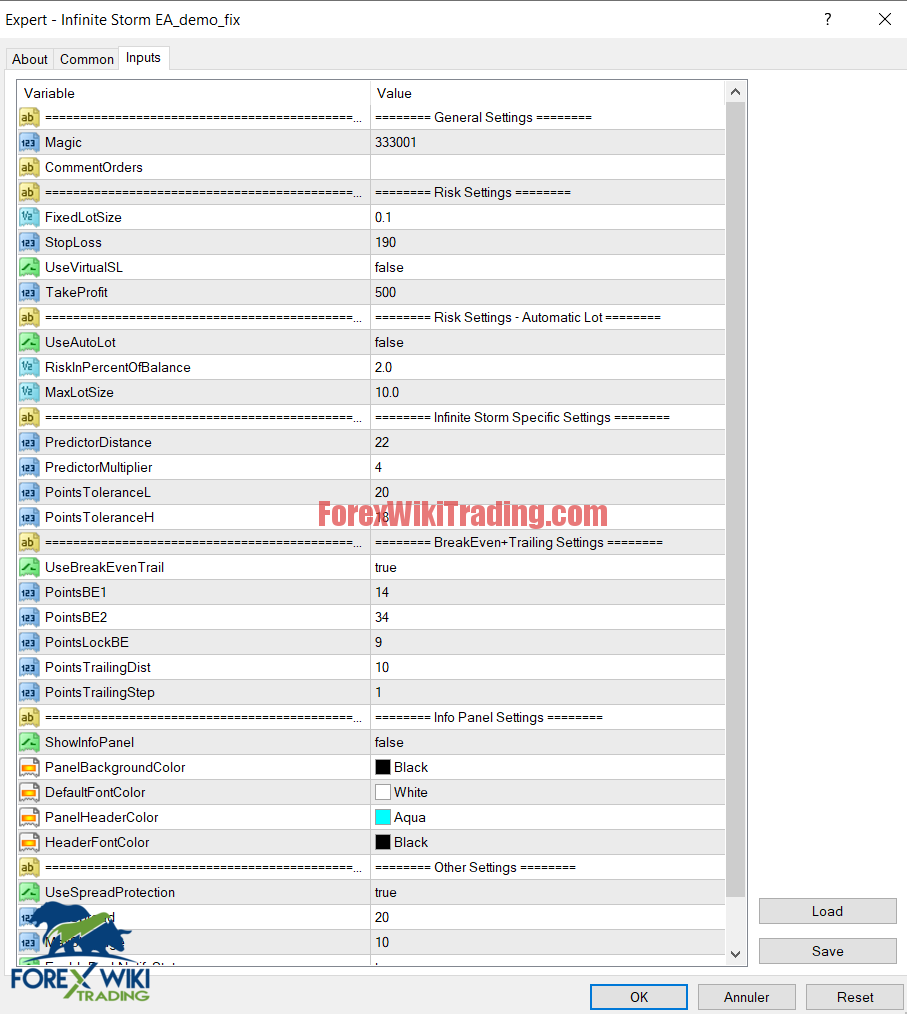
General Settings
- Magic – Magic number – MUST be unique for each chart
- CommentOrders – Optional – Custom comment for orders
Risk Settings
- FixedLotSize – Fixed size of the Lot to trade (UseAutoLot has to be disabled)
- StopLoss – Stop loss in points
- UseVirtualSL – Enable/Disable Virtual stop loss (recommended is disable – “false”)
- TakeProfit – Take profit in points
Risk Settings – Automatic Lot
- UseAutoLot – Enable/disable automatic lot size calculation base don account balance and StopLoss
- RiskInPercentOfBalance – Risk in percent of account balance
- MaxLotSize – Maximum size of the lot
Infinite Storm Specific Settings
- PredictorDistance – Main parameter to determine the trend and price movements
- PredictorMultiplier – Determines the number of cycles to analyse trend and price movements
- PointsToleranceL – Tolerance for trend and price movements (Low tolerance)
- PointsToleranceH – Tolerance for trend and price movements (High tolerance)
BreakEven + Trailing Settings
- UseBreakEvenTrail – Enable/Disable Break Even + Trailing Stop
- PointsBE1 – Break Even 1st level in points
- PointsBE2 – Break Even 2nd level in points
- PointsLockBE – Points lock in profit after Break Even (but it is also combined with the 2nd level of Break Even)
- PointsTrailingDist – Trailing Distance in Points
- PointsTrailingStep – Trailing Step in Points
Info Panel Settings
- ShowInfoPanel – Show/Hide Info Panel
- PanelBackgroundColor – Info Panel background color
- DefaultFontColor – Info Panel main font color
- PanelHeaderColor – Info Panel Header background color
- HeaderFontColor – Info Panel Header font color
Other Settings
- UseSpreadProtection – Enable/Disable spread protection
- MaxSpread – Max spread in points (Running mean spread)
- MaxSlippage – Max slippage for positions to open
- EnablePushNotifyStatus – Enable/disable sending EA status via Push notifications (interval of notification set by StatusIntervalInHours)
- StatusIntervalInHours – Interval in hours for EA status message (Printed to the Expert tab)
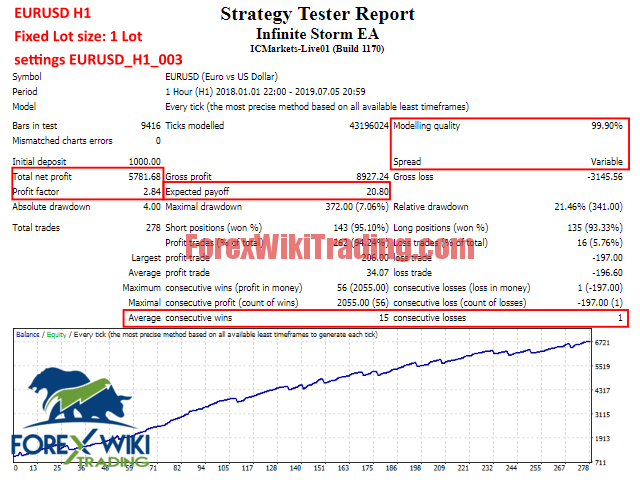
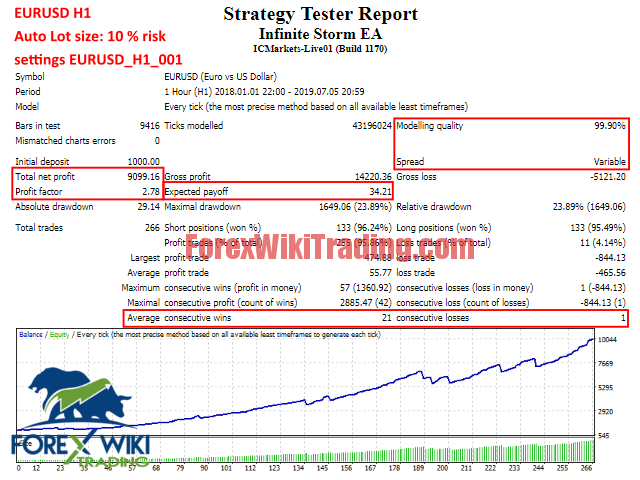
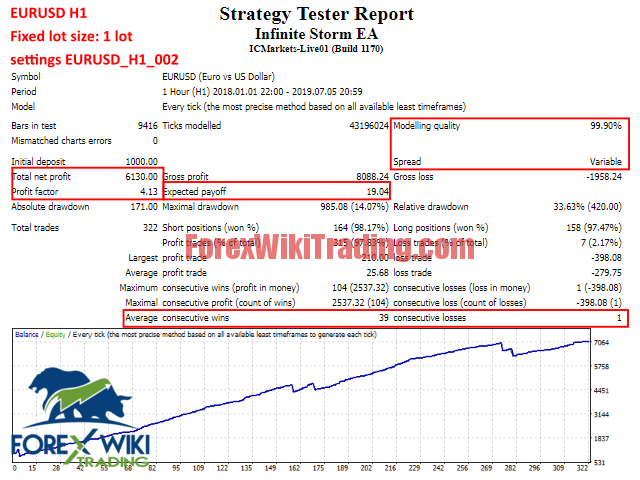
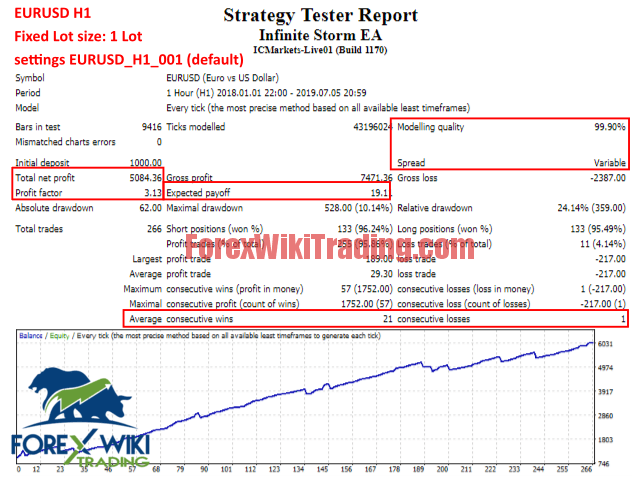
Infinite Storm EA Results:
Download Fx Dangerous Storm EA: