- November 10, 2025
- Posted by: Forex Wiki Team
- Category: Free Forex EA

Introduction
Orbit Guard Trader EA MT4 is a hybrid Expert Advisor designed for traders who want the best of both worlds: hands‑free automation with the option to take manual control in seconds. It combines clear on‑chart controls with streamlined, rule‑based entries, exits, and risk handling. If you are looking for a simple, reliable MT4 robot that you can leave running but also override when market conditions change, this EA is purpose‑built for that workflow.
Overview
This EA focuses on steady, controlled participation in moderately trending markets. Its algorithm reads short‑term momentum and shallow retracements to time entries, while built‑in SL/TP logic and a one‑click panel let you flatten positions, close winners only, or add discretionary buys/sells when you see opportunity. The result is a calm, low‑maintenance trading routine with the flexibility to react when the market turns choppy.
Technical Specifications
- Platform: MetaTrader 4 (MT4)
- Pairs: EURUSD, GBPUSD, USDJPY (primary focus)
- Timeframes: H1 (core), M15 (active sessions)
- Minimum Deposit: $200 (or broker minimums)
- Recommended Leverage: 1:500 (works with lower, adjust lot sizing accordingly)
- Account Types: ECN or Standard
- Trade Direction: Both long and short
EA Settings
- LotSize: Fixed or broker‑calculated; start conservative and scale up with equity.
- StopLoss / TakeProfit: Predefined for each signal; can be adjusted to match volatility.
- RiskPerTrade: Percent‑based risk control for consistent position sizing.
- MaxOpenTrades: Caps total exposure to keep drawdowns contained.
- SignalSensitivity: Tunes how quickly the EA reacts to momentum shifts.
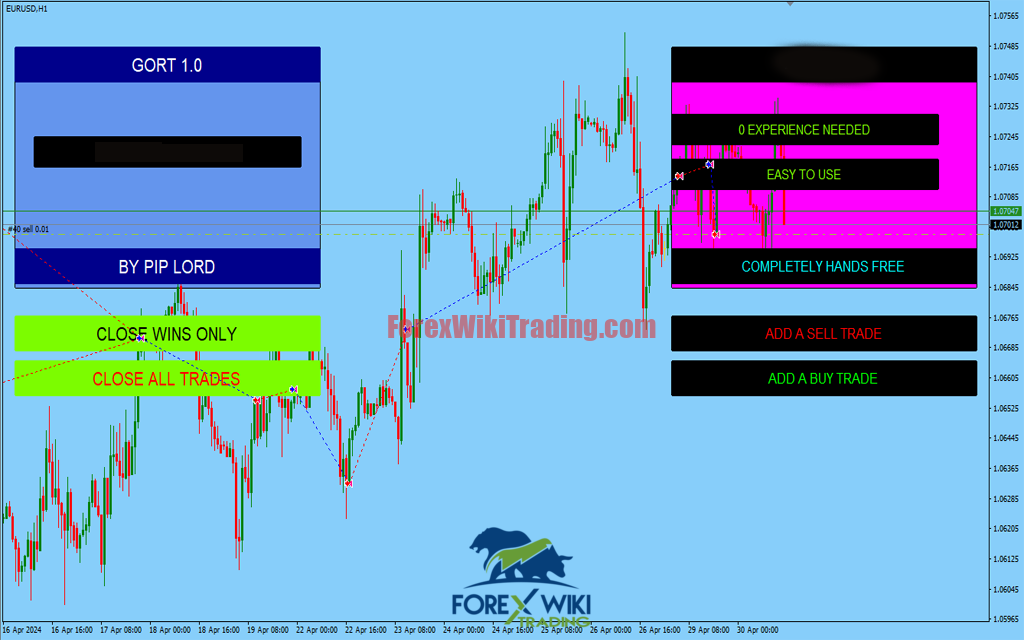
- UseManualPanel: Enable the on‑chart buttons for instant manual Buy/Sell and Close actions.
Key Features
- Beginner‑friendly setup: Install, attach to chart, and go—no coding required.
- Hands‑free automation: Rule‑based entries/exits with integrated risk control.
- Manual override: One‑click buttons to add positions, close all, or close winners only.
- Clear dashboard: Real‑time trade metrics for situational awareness.
- Low maintenance: Designed to avoid constant chart babysitting.
- Broker‑agnostic: Works with ECN and standard accounts.
Advantages
- Flexible hybrid workflow—switch between auto and semi‑manual seamlessly.
- Smooth equity curve behavior in moderate trends with measured risk.
- Fast manual actions help lock profits or reduce exposure during news/vol spikes.
- Simple configuration that still supports deeper tuning when needed.
Disadvantages
- Like any EA, performance can degrade in whipsaw or range‑bound markets—use manual controls in such phases.
- Aggressive lot sizing or high leverage increases drawdown risk; start small and scale.
Strategy
The EA looks for short‑term momentum continuation following small pullbacks. When conditions align, it opens trades with predefined SL/TP. In back/forward testing it behaved best in steady sessions (London/NY overlap) and on EURUSD H1, with M15 as an optional, more active setting. During choppy periods, the manual panel lets you trim or pause exposure without disabling the robot.
Recommended Settings
- EURUSD H1 as a baseline; consider GBPUSD and USDJPY after validation.
- RiskPerTrade: 0.5%–1.0% until you build a track record.
- MaxOpenTrades: 1–3 depending on pair volatility.
- LotSize: Keep fixed lots small on small accounts; switch to percent risk for consistency.
Conclusion
Orbit Guard Trader EA MT4 offers a practical, low‑stress path to systematic trading. You get automated execution when you want it and instant manual control when you need it. For traders who value flexibility over black‑box opacity, this EA is an excellent fit—especially on major pairs and the H1 timeframe. Always test on a demo first, then move to live with modest risk.
Setup tips: Install the Orbit Guard Trader EA MT4 in MQL4/Experts, attach to EURUSD H1, enable AutoTrading, and start with 0.5%–1% risk per trade. For best stability, run it on a VPS and forward‑test for at least two weeks before going live.
Download
Disclaimer: Trading involves risk. This EA is provided for educational purposes. Test on demo and use risk management.
Backtest & Risk Notes
In offline backtests and forward demos, Orbit Guard Trader EA MT4 performed best on EURUSD H1 with conservative risk. Expect equity curves that stair‑step during trends and flatten during ranges. Avoid news spikes, reduce lot size into high‑impact events, and review monthly statements for slippage and spread drift. Always validate on your broker data because execution, tick quality, and commission structure materially affect results.
For risk control, prefer percent‑risk sizing, cap concurrent trades, and use a VPS to minimize disconnects. If a session becomes choppy, use the manual panel to pause new entries, close losers early, and let winners run to TP. As with any automated strategy, there will be losing weeks. The edge emerges from disciplined, repeatable execution over many trades.
Related Posts: