- September 5, 2025
- Posted by: Forex Wiki Team
- Category: Free Forex EA
Introduction
Think of TrendSync Trade EA as a compact MT4 robot built to follow and ride trends while using scalper-style profit-taking and trailing stops to lock gains. It’s the rebranded presentation of the EA with a single core strategy: combine trend logic with scalper/ trailing rules to reduce risk and capture swings. The vendor lists the EA as optimized for currency pairs and Gold, and recommends starting with the default settings and at least $200 balance.
Technical Specifications
Version: 1.0
Year of issue: 2025
Working pairs: Any
Recommended timeframe: M5
Minimum Deposit: $500
Average of account: 1:30 To 1:1000
Best Brokers List
TrendSync Trade EA works with any broker and any type of account, but we recommend our clients use one of the top forex brokers listed below:
[ninja_tables id=”26339″]
TrendSync Trade EA Settings

-
Max Spread: 30–50 (recommended > average spread of pair).
-
Fixed Lot / Auto Lot: Fixed Lot = 0 activates Auto Lot. Auto Lot = 1.0 means 1 lot per $100,000 balance (0.01 lots per $1,000).
-
Take Profit: 350 (points)
-
Stop Loss: 250 (points)
-
Use Trailing: True/False, with Trailing = 10 (points), Start Trailing = 45 (points)
-
Max Trades: 5
-
Volatility: 100 (filter)
-
Use EMA Trend: True/False (EMA Period default = 20 on timeframe M5)
-
Trading time window: default 01:30 — 22:30 (hour:minutes)
-
Auto Magic Number: True/False (auto assign Magic Numbers).
Note: If you trade XAUUSD with 3-decimal pricing the author warns to multiply spread & TP/Trailing values by 10 (point scale differs).
Overview & core strategy
TrendSync Trade EA blends:
-
Scalper mechanics — relatively tight profit targets and quick exits on the listed settings (Take Profit and Trailing).
-
Trailing & risk controls — built-in Stop Loss and trailing stop options to help protect profits and reduce drawdown.
-
Optional EMA trend filter — to avoid trading against the larger trend (can be toggled on/off).
The author describes it as a “core strategy distilled over many years of research and optimization for the Forex and Gold markets,” with trade limits, volatility filtering and the option to use auto lot sizing.
Backtests
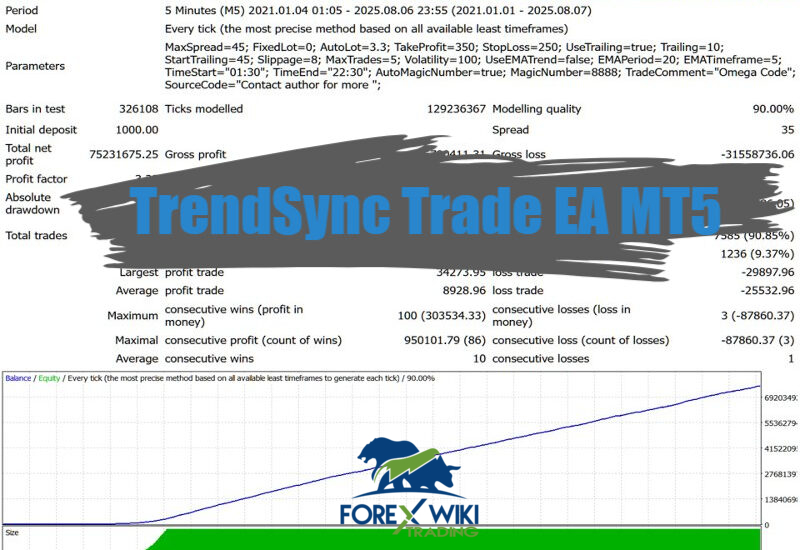
The MQL5 product listing focuses on parameters and strategy description, but doesn’t show a comprehensive Myfxbook/live-signal report on the product page (so there’s no single linked verified public live-history to quote). Because of that, I recommend running the EA on a demo or using an MQL5 virtual hosting plus your own forward test before committing real funds.


Pros & Cons
Pros
-
✅Simple, clean feature set — scalper + trailing + EMA filter gives you control
-
✅Auto-lot and safety controls (max trades, spread limit) make risk management straightforward
-
✅Configurable for Gold (XAU) and currency pairs.
Cons
-
❌No publicly-verifiable live track record linked on the product page (so you’ll want to demo/forward-test)